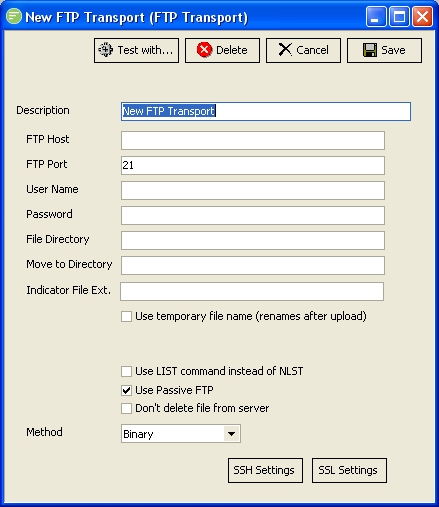
A FTP Transport is used to connect to a FTP service over the Internet or local network. You can send Files to the remote FTP service. You configure the FTP Transport with the appropriate details for connecting to the remote service and sending files.
The FTP Transport can be used to make FTP, FTP-S, and SFTP connections. While SFTP has no relation to the FTP protocol technically, it is often confused with FTP and for simplicity sake we have combined the two protocols.
| Field Name | Description |
|---|---|
| Description | A friendly name for the FTP Transport. |
| Host | The domain name or IP address of the remote FTP service |
| Port | The port the remote FTP service is listening on |
| User Name | A user name to connect to the remote FTP service |
| Password | A password for the above user |
| File Directory | The directory on the remote FTP service to upload the file to. Enter the path relative to the root of the FTP service. |
| Move to Directory | The directory on the remote FTP service to move the file to after uploading. Enter the path relative to the root of the FTP service. Some parties use this as a method of indicating that the file has finished uploading. |
| Indicator File Ext. | If a value is entered Flow will create an "indicator" file with the same name as the uploaded file but using the entered extension. Some parties use this as a method of indicating that the file has finished uploading. |
| Use temporary file name | A temporary file name to use during upload. The file will be renamed after upload to the original name. Some parties use this as a method of indicating that the file has finished uploading. |
| Use Passive FTP | Uses Passive FTP mode |
| Method | Select either ASCII, BINARY, or AUTO mode for sending data. You should try BINARY first. |
| Button Name | Description |
|---|---|
| Save | Click to save any changes you have made. All changes will be lost if you do not click the Save button. |
| Cancel | Click to cancel any changes you have made |
| Delete | Click to delete this module. You will be asked to confirm your choice. |
| Test With... | Click to test the connection to the remote FTP service. You need to select the File connection that will be used to find a file for sending. This will cause the transport to run and send the first file that exists in the File Connection that match the File Search Pattern. |
| SSH Settings | Click to edit the SSH settings used when making the connection to the FTP Transport |
| SSL Settings | Click to edit the SSL settings used when making the connection to the FTP Transport |